Starlink Roam is Starlink’s plan for people who need internet away from a fixed address: RVs, van life, boats, temporary job sites, or anyone who travels regularly. This guide covers what Roam actually is, current 2026 pricing, the hardware options, realistic performance expectations, and who it’s a good fit for, based on Starlink’s own published specifications and policies rather than a single traveler’s trip.
Key Takeaways
- Roam now has three tiers: 100GB, 300GB, and Unlimited, replacing the old flat 50GB/Unlimited lineup.
- Setup is genuinely simple: point the dish at open sky, plug it in, and the app walks you through the rest.
- Roam traffic is deprioritized behind Residential during network congestion, expect slower speeds in busy areas at peak times.
- The Standby (pause) feature lets you stop paying during months you’re not traveling.
- Weather and obstructions (trees, buildings) affect performance more than the marketing suggests.
- Understanding Starlink Roam: What You're Actually Getting
- Hardware: Starlink Mini vs. the Standard Kit
- Pricing Breakdown: The Real Cost of Starlink Roam
- Setup: From Box to Internet
- Performance: Speed, Reliability, and Limitations
- Use Case Scenarios: Is Starlink Roam Right for You?
- Starlink Roam vs. the Alternatives
- Support and Long-Term Ownership
- Tips for Getting the Most Out of Roam
- Is Starlink Roam Worth It?
- Final Thoughts
Understanding Starlink Roam: What You’re Actually Getting
What Exactly is Starlink Roam?
Starlink Roam uses Low Earth Orbit (LEO) satellite technology to deliver internet anywhere with a clear view of the sky. Unlike traditional satellite internet that relies on geostationary satellites 22,000 miles away, Starlink’s constellation orbits roughly 340 miles above Earth, which is what makes its latency so much lower than older satellite services.
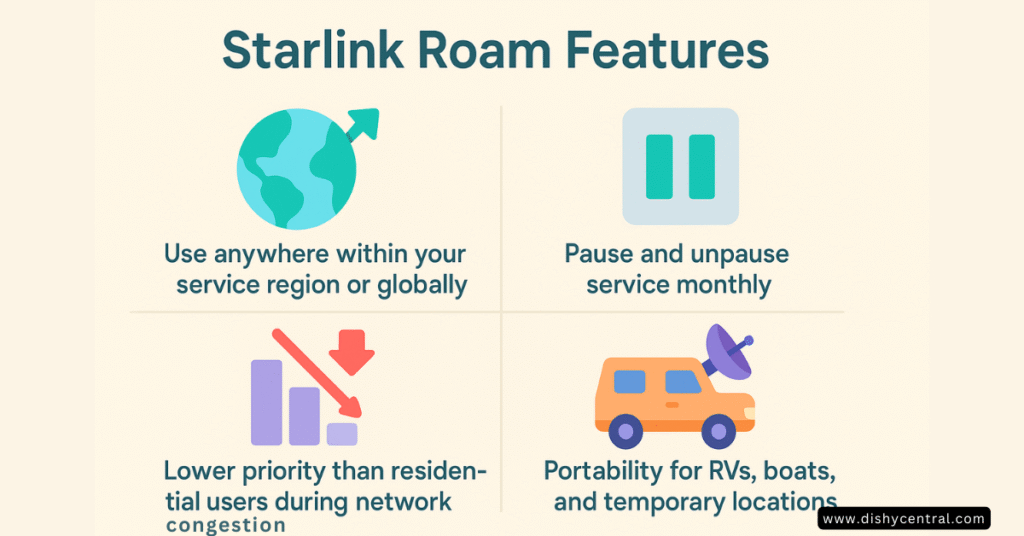
Here’s what makes Roam different from Starlink Residential:
- Usable anywhere within your purchased service region, or worldwide on Global/Regional add-ons
- Can be paused and resumed month to month (Standby)
- Lower network priority than Residential during congestion
- Supports in-motion use (driving, not just parked) up to 100 mph on every Roam tier, per Starlink’s own documentation, no separate plan upgrade required
Current Roam Plan Options (2026)
| Plan | Price | What it’s for |
|---|---|---|
| Roam 100GB | $55/month | Occasional or weekend use |
| Roam 300GB | $80/month | Regular travelers, moderate streaming |
| Roam Unlimited | $175/month | Full-time travel, remote work, heavy streaming |
All three tiers fall back to reduced-priority, still-usable data once you’re past the plan’s high-speed allotment, rather than a hard cutoff, with one specific exception: if you exceed your allotment while using Mobile Priority data on open water, that connection does get cut off (account access only) until more data is purchased. That’s one of the only genuinely hard caps anywhere in Starlink’s lineup.
A separate Global Priority add-on extends coverage to more countries and includes maritime use; pricing for it is higher and varies by data tier, check your account for current rates in your situation.
| Related: Starlink Roam vs Residential: Key Differences Explained
Hardware: Starlink Mini vs. the Standard Kit
Choosing Between Them
Both work with any Roam plan. The choice comes down to size, power budget, and how often you’re packing up and moving.
Starlink Mini Advantages
- Significantly smaller and lighter than the standard kit, easy to store in an RV compartment or backpack
- Built-in WiFi router, no separate router box to carry or power
- Lower power draw, roughly 20-40 watts in typical use per Starlink’s published specs, versus 75-100 watts for the current-generation standard kit
- Fast to set up and pack away, useful if you’re moving sites often
Standard Kit Advantages
- Larger antenna generally performs better in marginal sky conditions
- Higher sustained throughput than the Mini in most conditions
- Better suited to a semi-permanent setup (parked for a season, a base camp, a boat)
If you move locations frequently and store the dish between uses, the Mini’s size and power draw usually win out. If you’re mostly stationary for weeks at a time and want the strongest possible connection, the standard kit is the better pick. Either works with any Roam data plan, the hardware choice and the data plan are independent decisions.
Where to buy the Mini: Starlink sells it directly on starlink.com. On Amazon it’s currently offered by third-party sellers, usually above Starlink’s own price, so compare before you buy, especially if Starlink warranty support matters to you.
Affiliate link: if you buy through it we may earn a commission at no extra cost to you. See our affiliate disclosure.
| Related: Starlink Power Consumption: What You Need to Know
Pricing Breakdown: The Real Cost of Starlink Roam
Hardware Costs (2026 Pricing)
- Starlink Mini: $199
- Standard kit: $349
- High-Performance kit (best for tougher conditions or larger coverage needs): around $2,500
Starlink runs sales periodically on all three, so check current pricing on your account before assuming list price.
Monthly Service Costs
- Roam 100GB: $55/month
- Roam 300GB: $80/month
- Roam Unlimited: $175/month
- Global Priority add-on: additional cost, varies by data tier and region
Costs People Often Forget
- Mounting hardware: roof mounts, tripods, or pole adapters, roughly $50-150
- Cable extensions: roughly $75-200 depending on where the dish ends up relative to the router
- DC power setup: for running directly off a battery bank instead of an inverter, roughly $100-300
- Weather protection: dish covers or storage cases, roughly $30-80
Rough annual cost, service only, before hardware: seasonal use (paused roughly half the year) lands around $330-1,050/year depending on tier; year-round use on the Unlimited plan runs about $2,100/year. Standby lets you pause billing during months you’re not using it, which is the main lever for controlling the annual total.
Setup: From Box to Internet
First-Time Setup
The Starlink app walks you through setup step by step:
- Use the app’s obstruction checker to find a spot with a clear view of open sky (look for a clear view to the north in most of North America); even thin branches can cause issues
- Unfold the dish (Mini) or set up the dish and router (standard kit) and connect the cable
- Plug into power
- Wait for satellite acquisition, typically a few minutes, occasionally up to 15-20 on a first setup
The Mini creates its own WiFi network immediately with nothing else to configure. The standard kit’s router needs its own quick setup the first time.
Common Setup Challenges
- Tree cover: even partial obstructions from branches can cause dropouts; a telescoping mount to get above the treeline helps in forested campsites
- Urban surroundings: buildings can create unexpected blind spots; the obstruction checker helps but sometimes you need to test a couple of spots
- Weather: rain and snow can degrade signal quality, and heavy storms can cause temporary disconnects
Performance: Speed, Reliability, and Limitations
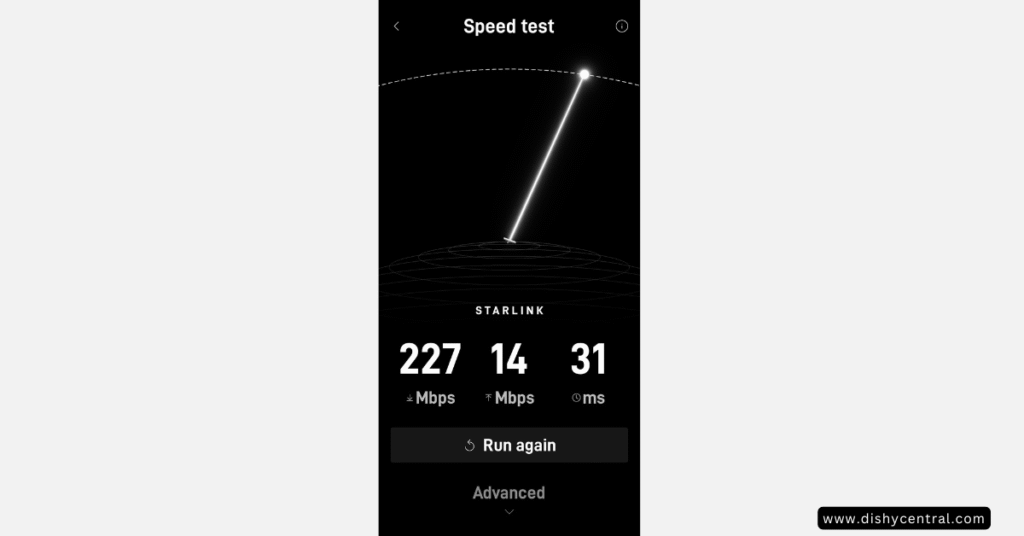
Starlink doesn’t publish a guaranteed speed for Roam, actual throughput depends heavily on how many other users are sharing your area’s capacity and where you are relative to a ground station. As a rough guide based on Starlink’s own typical-range guidance and widely reported user experience: expect somewhere in the range of 40-150 Mbps download and 5-25 Mbps upload in lightly used areas, dropping meaningfully in crowded locations (popular campgrounds, cities) especially during evening peak hours, since Roam traffic is deprioritized behind Residential when a cell is congested.
What to Expect for Common Activities
- Video calls: generally solid for standard-definition calls; 4K video calls can struggle during congested periods
- Streaming: 1080p is generally reliable; 4K is more hit-or-miss depending on location and time of day
- Large uploads: upload speed is the bottleneck for big files, plan for patience or overnight transfers
- Gaming: latency in the 25-50ms range works fine for most casual and many competitive games; occasional handoff-related stutters can affect twitch-reflex competitive play
Weather Impact
| Condition | Typical effect |
|---|---|
| Light rain | Minor, if any, speed reduction |
| Heavy rain | Noticeable slowdown, occasional brief drops |
| Snow | Light snow usually melts off (the dish self-heats); heavy accumulation can block the signal until cleared |
| Wind | No direct effect on throughput, but can affect a poorly secured mount’s aim |
The self-heating snow-melt feature draws meaningfully more power when it’s active, worth planning for if you’re running on a limited battery bank in cold weather.
Use Case Scenarios: Is Starlink Roam Right for You?
Weekend or Occasional Traveler
Best plan: Roam 100GB ($55/month), paused when not traveling. If you’re out a few weekends a month, 100GB usually covers browsing, some streaming, and video calls without hitting the cap.
Full-Time Remote Worker
Best plan: Roam Unlimited ($175/month). Deprioritization during congestion is the main downside, manageable if your work schedule has some flexibility around peak evening hours in busy areas.
Families on the Road
Best plan: Roam Unlimited ($175/month). Multiple devices streaming, gaming, and doing schoolwork burn through a metered tier fast; the unlimited plan avoids constantly tracking usage.
Remote Expeditions and Overlanding
Best plan: Roam with the Global Priority add-on for cross-border or off-grid use. This is where Roam earns its keep, working in places cellular simply doesn’t reach, though you’ll need a solid power setup and some weather protection strategy for the dish.
Starlink Roam vs. the Alternatives
Mobile Hotspots (Cellular)
Cellular wins when: your usage is light, you want to spend less, you need connectivity while actually driving (Roam supports in-motion use, but a phone hotspot is simpler for this), or you’re mostly near towns with decent coverage.
Roam wins when: you’re somewhere cellular doesn’t reach, you want higher sustained speeds where you do have signal, or you’re supporting multiple people’s devices at once.
Traditional Satellite (HughesNet, Viasat)
Roam’s latency (25-50ms typical) is dramatically lower than geostationary satellite services (600ms+), which is the difference between video calls and gaming being usable versus not. Traditional satellite services generally cost less upfront and have longer-established customer service operations, but the latency gap is hard to overstate.
Campground WiFi
Campground WiFi is often slow (commonly in the 1-10 Mbps range when shared across a full campground), can raise security concerns on an open shared network, and sometimes carries its own fee. Roam gives you a private, dedicated connection independent of whatever the campground provides, at the cost of the monthly plan.
Support and Long-Term Ownership
What Starlink’s Support Actually Looks Like
- Primary support channel is the Starlink app and help center, ticket-based rather than live chat for most issues
- Starlink does provide phone support for active connection problems in several countries, though it isn’t positioned as a general-purpose support line for every question
- Community forums and subreddits are a common source of peer troubleshooting help
- Hardware replacement, when something fails under warranty, is handled through the app
Response times on ticketed support vary with issue severity and current volume; simple account or billing questions tend to move faster than technical troubleshooting.
Software Updates
The system updates automatically, usually overnight, and updates have generally added features or improved obstruction handling and network performance over time rather than requiring any action from you.
Tips for Getting the Most Out of Roam
Dish Placement
- Always run the app’s obstruction checker before settling on a spot
- Even thin branches can cause dropouts, aim for genuinely clear sky
- Elevation helps, a roof mount generally outperforms ground placement
- Keep cable runs as short as practical to reduce clutter and failure points

Power Management for Off-Grid Use
- Schedule heavy downloads for peak solar hours if you’re running on batteries
- Use the app’s sleep/standby options when you’re not actively online
- A 12V DC power setup avoids inverter losses versus running through an AC inverter
- Monitor power draw through the app, especially in cold weather when the snow-melt heater may be active
For short sessions away from your vehicle or campsite power, a clip-on power bank is the simplest setup for the Mini. We looked at the RAVION Battery Lite, a 99 Wh pack that clips onto the Mini. The maker says it gives about 4–6 hours of Mini use; that is the manufacturer’s figure, not independent testing, and heavy use drains it faster.
Troubleshooting Common Issues
“Searching for satellites”: check for obstructions blocking your view of open sky, confirm the dish is level and stable, give it up to 15-20 minutes on a first-time setup, and try relocating 50+ feet if a spot just isn’t working.
Slow speeds: run a speed test at a different time of day (congestion is often the cause), check for new obstructions, and try restarting the system from the app.
Frequent disconnections: inspect cable connections for damage or corrosion, verify a stable power source, and watch for intermittent obstructions like a branch swaying into the sky path.
Accessories Worth Considering
- Telescoping or elevated mount: for getting above nearby obstacles, roughly $75-150
- Weatherproof cable management: protects connections from the elements, roughly $25-50
- Carrying case: useful if you’re setting up and tearing down often, roughly $40-80
- 12V power adapter: improves off-grid efficiency versus an inverter, roughly $60-120
Mounting the Mini on a vehicle: a magnetic roof mount holds the Mini on a steel roof without drilling. Magnets don’t grip aluminum or fiberglass, so check your roof first. See our NovaKits magnetic mount review and our roundup of Starlink Mini mounts.
Is Starlink Roam Worth It?
Where Roam Does Well
- Coverage: works reliably in remote locations where cellular has no signal at all
- Latency: at roughly 25-50ms typical, it supports video calls and casual-to-moderate gaming, something older satellite services simply couldn’t do
- Portability: the Mini in particular is genuinely quick to set up and pack away
- Standby flexibility: pausing billing during unused months makes the economics work for seasonal travelers
Where It Struggles
- Power draw: a real consideration for off-grid setups running on limited battery capacity
- Weather sensitivity: heavy rain and snow noticeably affect performance
- Congestion: speeds can drop substantially in busy areas during peak hours, due to deprioritization behind Residential
- Cost: $175/month for Unlimited is a real expense, though it’s broadly competitive with unlimited cellular plans once you account for coverage in places cellular doesn’t reach
- Obstruction sensitivity: even minor branches or structures can cause issues, finding a genuinely clear spot takes some effort
Who Should Consider It
Worth it if you: travel to genuinely remote areas regularly, need reliable internet for remote work on the road, can budget for the Unlimited tier if needed, have adequate power generation for off-grid use, or camp outside established cellular coverage.
Consider alternatives if you: mostly stay near cities with good cellular coverage, have light internet needs, are very budget-conscious, mainly stay at RV parks with included WiFi, or need connectivity specifically while driving (a cellular hotspot is often simpler for that specific case, even though Roam supports in-motion use too).
Value by User Type
- Occasional travelers: the 100GB plan plus Standby pausing keeps annual cost modest
- Full-time travelers: Unlimited at $175/month is a real cost but broadly comparable to unlimited cellular plans once you factor in the coverage gap Roam fills
- Remote workers: often worth it despite the cost, given the alternative is frequently no connectivity at all
- Families: the Unlimited plan tends to become necessary quickly once multiple devices are involved
Final Thoughts
Starlink Roam has genuinely changed what’s possible for internet access while traveling, providing usable connectivity in places that simply had none a few years ago. The technology works largely as described, with real caveats around power draw, weather sensitivity, and congestion-based deprioritization that are worth understanding before you commit to the monthly cost.
For travelers with realistic expectations about those trade-offs and a genuine need for connectivity away from fixed infrastructure, Roam delivers on its core promise. The Mini paired with the Unlimited or 300GB plan is a reasonable starting point for most people weighing performance against convenience and cost.