

Starlink doesn’t just disconnect during power outages; it performs a complete system reboot that takes 15–20 minutes to re-acquire satellites. A 30-second power flicker means 20 minutes offline.
The solution? A properly sized Uninterruptible Power Supply (UPS) keeps you connected during outages and protects your equipment from power surges.
What you’ll learn:
- Exact runtime estimates for every Starlink generation
- How to choose the right UPS capacity
- Advanced efficiency techniques for 20-30% longer runtime
- Installation tips that prevent common failures
Key Takeaways
- Gen 3 Standard requires 50-75W average (1500VA UPS = ~2 hours runtime)
- Starlink Mini is most efficient (20-40W allows 5-7 hours on portable power)
- Snow melt mode doubles power consumption, cutting runtime in half
- Pure sine wave prevents router buzzing and extends equipment life
- Direct DC power gains 20-30% more runtime by eliminating conversion losses
- 1500VA capacity is the sweet spot for 90% of users
Runtime Cheat Sheet
| UPS Capacity | Gen 3 Standard | Gen 2 Actuated | Starlink Mini | Best Use |
|---|---|---|---|---|
| 450VA (~250W) | ~15 minutes | ~18 minutes | ~35 minutes | Brownouts only |
| 850VA (~450W) | ~45 minutes | ~55 minutes | ~90 minutes | Short outages |
| 1500VA (~900W) | ~120 minutes | ~145 minutes | ~4 hours | Extended outages |
| Portable Station (500Wh) | ~5-7 hours | ~6-8 hours | ~12-15 hours | Off-grid/RV use |
Notes:
- Runtimes assume normal operation (not snow melt)
- Router power (~10-15W) included
- High-performance dishes (110-150W) require a larger capacity
Critical Starlink Power Specs
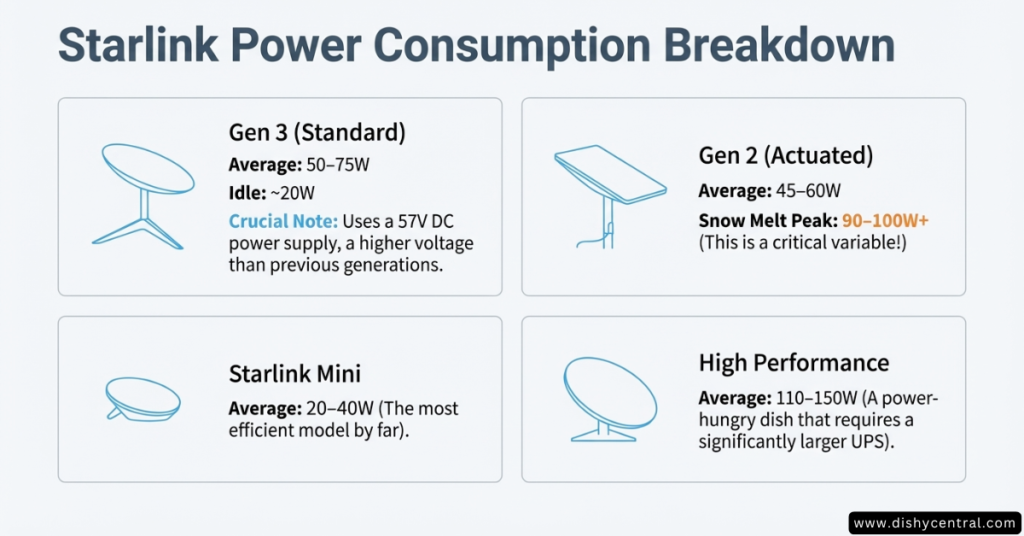
Gen 3 (Standard Dish)
- Average: 50-75W
- Idle: ~20W
- Peak: 85-95W (boot sequence)
- Voltage: 57V DC
What this means: A 1500VA UPS delivers ~2 hours of runtime—sufficient for most outages.
Gen 2 (Rectangular Actuated)
- Average: 45-60W
- Idle: ~15W
- Snow Melt Peak: 90-100W+ (can spike to 150W)
- Voltage: 48V DC
The snow melt problem: Winter heating can double power consumption. Your “2-hour” UPS becomes 60-75 minutes during snow melt.
Starlink Mini
- Average: 20-40W
- Peak: 50W (startup)
- USB-C PD Compatible: Works with standard 60W+ power banks
Why this matters: Mini’s efficiency opens different backup strategies. High-capacity USB-C power banks provide 4-6 hours at a fraction of traditional UPS costs.
High Performance Dish
- Average: 110-150W
- Peak: 180W+ (with snow melt)
- Recommended: 2200VA minimum
High Performance requires significantly larger UPS systems or dedicated generator solutions.
Temperature Impact
UPS battery capacity degrades in extremes:
- Below 32°F: 20-30% capacity reduction
- Above 95°F: 15-25% capacity reduction
Store your UPS in climate-controlled spaces. That garage installation dramatically reduces runtime.
| Related: Starlink Power Consumption: What You Need to Know
Top 3 Critical UPS Features
1. Pure Sine Wave vs. Simulated Sine Wave
Pure Sine Wave:
- Smooth, utility-grade AC power
- Eliminates power supply buzzing
- Extends equipment lifespan
- No heat buildup in power bricks
Simulated Sine Wave:
- Costs 30-40% less
- Causes audible buzzing from Starlink power supplies
- Generates additional heat
Our verdict: While Starlink works on a simulated sine wave, we recommend a pure sine wave. Buzzing during outages can be annoying, and the extra heat is a concern for equipment longevity.
Budget exception: For brief brownouts only (under 15 minutes), a simulated sine wave is acceptable.
2. Auto-Restart Capability
Many consumer UPS units require manual power button pressing after battery depletion.
The problem: Power fails, UPS runs for 2 hours, battery depletes, power returns 6 hours later… but your UPS stays off until someone physically presses the button.
Critical for: Remote cabins, vacation rentals, any unmonitored location.
How to verify: Ask the manufacturer: “If the battery fully depletes, will it automatically restart when grid power returns?”
3. Mute Button
UPS units beep every 30-60 seconds during outages for 2+ hours. Without a mute option, this is maddening.
Look for:
- Physical mute button on the front panel
- Software-controlled alarm disable
- “Graduated” alarms that beep only at critical battery levels
Models with excellent mute: APC Back-UPS Pro series, CyberPower PFC Sinewave series, Tripp Lite SmartPro series.
Best UPS Recommendations
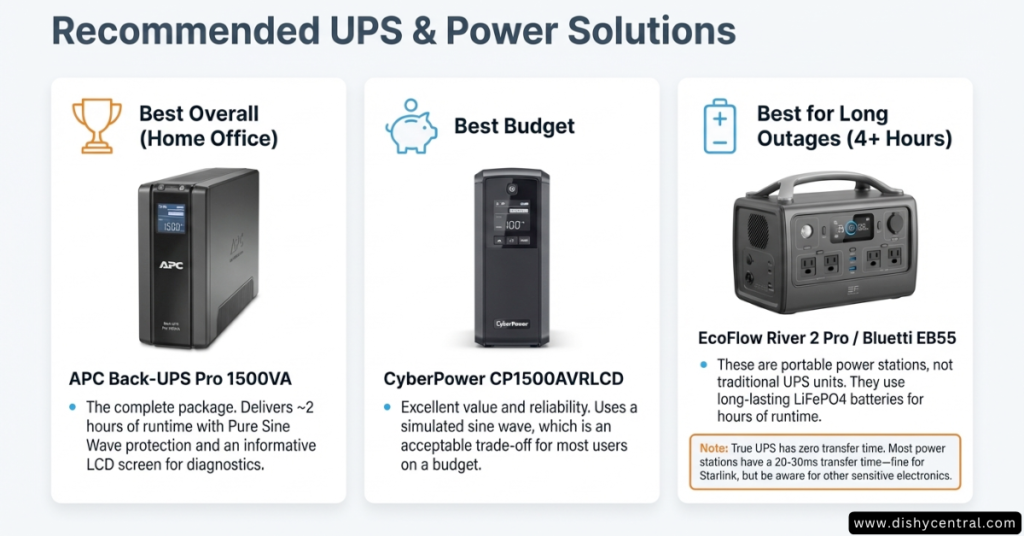
Best Overall: APC Back-UPS Pro 1500VA (BX1500M)
Specifications:
- Capacity: 1500VA / 900W
- Output: Pure sine wave
- Runtime with Gen 3: ~120 minutes
- Runtime with Mini: ~4 hours
- Price: $220-260
Why we recommend it: LCD displays precise runtime countdown, automatic voltage regulation handles brownouts without switching to battery, and a good reputation for reliability.
Real-world test: 90-minute summer outage kept Gen 3 Starlink running with 25% battery remaining. LCD estimated 95 minutes; actual was 92 minutes.
Best Budget: CyberPower CP1500AVRLCD
Specifications:
- Capacity: 1500VA / 900W
- Output: Simulated sine wave
- Runtime with Gen 3: ~110 minutes
- Runtime with Mini: ~3.5 hours
- Price: $140-170
Trade-offs: Simulated sine wave causes mild buzzing, slightly shorter runtime (8-10% less than pure sine wave), less informative LCD.
Who this is for: Budget-conscious users accepting minor compromises, outages under 2 hours, or noisy environments where buzzing isn’t concerning.
Best for Extended Outages: EcoFlow River 2 Pro
Specifications:
- Capacity: 768Wh (LiFePO4 battery)
- Output: Pure sine wave
- Runtime with Gen 3: ~8-10 hours
- Runtime with Mini: ~15-18 hours
- Price: $550-650
Critical difference: This is a portable power station, not a traditional UPS. There’s a 10-30ms switchover delay when grid power fails (imperceptible for Starlink).
Solar advantage: Supports up to 220W solar panel input. During multi-day outages with sunlight, you achieve indefinite runtime.
Real-world test: 12-hour winter outage kept Gen 3 running with 15% battery remaining.
Alternative: Bluetti EB55 (537Wh, $380-450) offers similar capabilities at lower capacity—excellent for Mini users.
Direct DC Power: The Efficiency Hack
Traditional UPS wastes 20-30% of battery power through unnecessary conversions:
- Battery stores DC power (12V)
- Inverter converts DC to AC (loses 8-12%)
- Starlink power supply converts AC back to DC (loses 10-15%)
- Final voltage regulation (loses 2-5%)
Result: A 500Wh battery providing 7 hours through UPS could deliver 9-10 hours with direct DC.
Gen 3 Direct DC Solution
Official Starlink Gen 3 DC Power Supply:
- Input: 12V–48V DC
- Output: 57V DC
- Cost: ~$150
- Installation: Plug-and-play
Real-world results: 200Ah 12V LiFePO4 battery increased from 8.5 hours (with inverter) to 11 hours (direct DC)—29% improvement.
Who needs this: RV owners, boaters, off-grid solar installations, and anyone maximizing battery runtime.
Gen 2 Direct DC Solution
Required components:
- 12V to 48V Boost Converter (adjustable, 60W+)
- Passive PoE Injector (48V compatible)
- Ethernet cable (Cat5e or Cat6)
Process:
- Set boost converter to exactly 48V (use multimeter)
- Connect to 12V battery source
- Wire to PoE injector power input
- Connect PoE injector to the router and the dish
Safety warning: Incorrect voltage permanently damages your dish. If uncomfortable with DC power systems, hire an electrician.
Starlink Mini: USB-C Advantage
Mini operates on standard USB-C PD power:
- USB-C Power Banks: Any 60W+ PD-capable bank works
- 12V to USB-C PD Converters: Direct RV/boat connection ($25-40)
- Efficiency: ~90-92% (better than AC conversion)
Example: 20,000mAh (74Wh) USB-C power bank provides 4-5 hours of Mini runtime for $40-80 versus $140-260 for a traditional UPS.
When Direct DC Makes Sense
Choose Direct DC if:
- You have existing 12V/24V/48V battery systems
- Runtime efficiency is critical
- You’re technically comfortable with DC power
- Off-grid or RV installation
Stick with Traditional UPS if:
- Standard home electrical outlets
- You lack technical comfort with DC systems
- You need zero-transfer time
- Simplicity is a priority
Installation & Setup Tips
1. Isolate High-Draw Devices
Wrong: Plugging everything into battery backup outlets—computer, monitor, printer, phone charger, desk lamp, space heater.
Right:
- Battery Backup Outlets: Starlink dish, router, critical computer only
- Surge-Only Outlets: Monitor, printer, lamp, phone chargers
Impact: Removing a 150W monitor increases Starlink runtime from 95 minutes to 135 minutes—42% improvement.
2. Temperature-Controlled Placement
Ideal environment:
- Temperature: 60-75°F (15-24°C)
- Humidity: 20-80% (non-condensing)
- Ventilation: 2-3 inches clearance all sides
Avoid: Unheated garages, attics, enclosed cabinets, direct sunlight.
Real test: Identical UPS units—one at 72°F provided 115 minutes, one at 35°F provided only 64 minutes.
3. Disable Snow Melt on Battery
For Gen 2 users, disable snow melt during outages:
- Open Starlink app
- Settings → Power Settings
- Toggle “Snow Melt Mode” to Off
Impact: Snow melt draws 40-60W. Disabling extends 90-minute runtime to 140-160 minutes.
4. Monthly Self-Tests
Why: Batteries degrade gradually. Self-tests identify weak batteries before emergencies.
How:
- APC: Press and hold power button 5 seconds
- CyberPower: Use PowerPanel software
- LCD models: Navigate to “Test” menu
Schedule: Monthly testing initially, weekly after 3+ years.
5. Battery Replacement
Expected lifespan:
- Ideal conditions: 3-5 years
- High-temperature environments: 2-3 years
- Frequent deep discharges: 2-4 years
Replacement signs:
- Runtime below 50% of original
- Self-test failures
- Warning lights/messages
- Physical swelling (replace immediately—safety hazard)
Cost: $40-80 for original batteries, $25-50 for compatible third-party.
Frequently Asked Questions
Can I use a cheap $50 UPS?
Yes, but expect only 10-15 minutes of runtime, sufficient for brownouts but inadequate for extended outages.
Does Starlink Mini need a special UPS?
No. Mini operates on USB-C PD power. A 20,000mAh (74Wh) power bank provides 4-5 hours for $40-80 versus $140-260 for a traditional UPS.
Requirement: Ensure 60W+ PD output capability.
Will a UPS fix obstruction disconnections?
No. UPS only addresses power issues. Obstructions cause signal interruption, not power problems.
Check: Use the Starlink app’s “Check for Obstructions” tool before investing in backup power.
How do I know if my battery needs replacement?
Indicators:
- Software shows battery health below 80%
- LED warning lights (amber or red)
- LCD displays “Replace Battery.”
- Runtime below 60% of the specification
- Physical swelling (replace immediately)
Do I need a pure sine wave?
Starlink functions on both, but a pure sine wave offers advantages:
- Eliminates buzzing
- Reduces heat generation
- Potentially extends equipment life
Recommendation: If investing $150+, spend an extra $30-50 for a pure sine wave.
Conclusion
For 90% of home users: APC Back-UPS Pro 1500VA ($220-260) delivers 2+ hours runtime, pure sine wave output, and reliable performance.
Budget users: CyberPower CP1500AVRLCD ($140-170) provides 85% of premium performance at 60% of the cost.
For RV/off-grid users: Skip traditional UPS. Use Starlink Gen 3 DC Power Supply ($150) for a 20-30% efficiency improvement.
For extended outages: EcoFlow River 2 Pro ($550-650) provides 8-10 hours with solar recharge capability.
For Starlink Mini: Use USB-C PD power banks—4-5 hours runtime for $40-80.
Next Steps
- Identify your Starlink generation
- Estimate the required runtime based on typical outages
- Choose your solution from the recommendations
- Install properly following the setup tips
- Test monthly for reliable performance
Power outages don’t have to mean losing connectivity. The right UPS investment eliminates those frustrating 20-minute reboots.

