
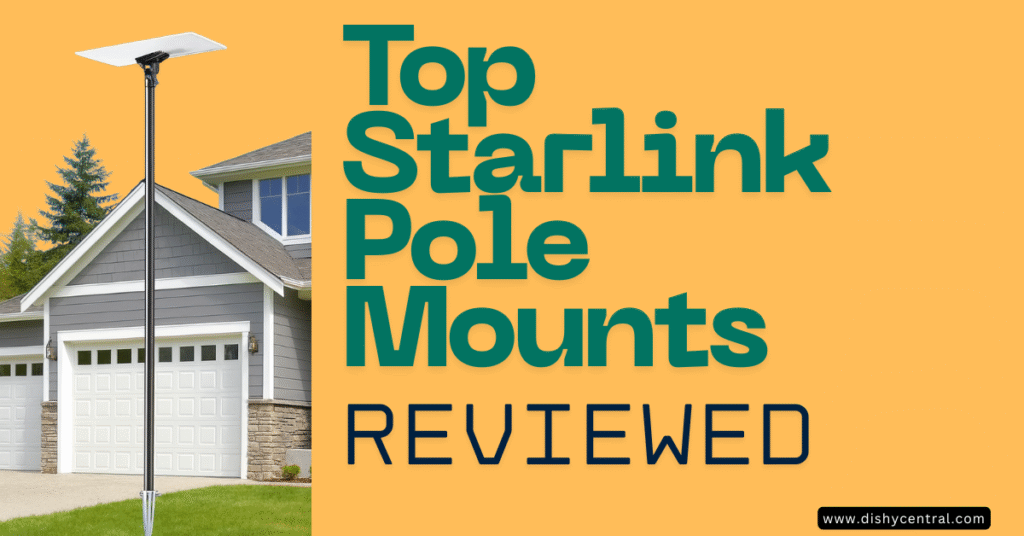
Getting reliable satellite internet depends heavily on how you mount your Starlink dish. If you’re dealing with trees blocking your view, an unstable roof setup, or simply want better signal strength, a pole mount could be your answer.
After reviewing many options and analyzing what works for Gen 3 installations, this guide covers the three best pole mounting kits that deliver real value. Whether you need a simple wall solution, a permanent ground installation, or a no-drill roof option, this guide will help you choose the right Starlink mounting kit for your situation.
Key Takeaways
- Gen 3 requires special adapters – The newest Standard dish doesn’t include a built-in pole mount, so you’ll need a dedicated Gen 3 pipe adapter
- Wall mounts offer the quickest installation – Perfect for getting your dish elevated without roof work or concrete
- Ground pole mounts provide maximum stability – Ideal for rural properties where you need height to clear obstructions
- Ridge mounts require no drilling – Use gravity and weight for secure rooftop installation without penetrating your roof
Understanding Starlink Pole Mount Requirements
Before you buy any mounting kit, you need to understand what makes a proper Starlink pole mount. The Gen 3 Standard dish differs significantly from previous versions, and using the wrong hardware can lead to a dish that wobbles in the wind or, worse, falls off completely.
What Makes Gen 3 Different?
The Starlink Gen 3 dish eliminated the integrated kickstand pole design. Instead, it uses a snap-in adapter system that attaches to the back of the rectangular satellite dish. This means you can’t simply slide it onto an existing pole—you need a compatible pipe adapter designed specifically for the V3 dish.
Most quality pole mount kits accommodate poles between 1.25 inches and 2.5 inches in diameter. The sweet spot? A 1.5-inch diameter pole offers the best balance of strength and compatibility with most hardware.
Signal Optimization Through Proper Mounting
Your Starlink antenna needs a clear 100-degree cone view of the sky for optimal performance. Mounting it higher helps you avoid obstructions like trees, buildings, and power lines. But height alone isn’t enough—stability matters just as much.
Wind can cause significant movement in longer poles, which directly impacts your connection quality. A wobbly installation might still work, but you’ll notice reduced bandwidth and increased latency during breezy conditions. The best mounting solutions minimize movement through proper bracketing, guy wires, or robust base construction.
| Related: The 5 Best Starlink Mini Mounts: Expert Reviews & Buying Guide
Top 3 Starlink Pole Mount Kits Compared
After extensive research and customer feedback analysis, these three mounting kits stand out for different use cases. Each offers distinct advantages depending on your property layout and installation goals.
Comparison Table: Best Starlink Pole Mount Options
SUBFIX Adjustable Wall/Roof Mount Kit
Why It’s Our Top Pick: This mount delivers exceptional versatility at an affordable price point. The aluminum Gen 3 pipe adapter sets it apart from cheaper plastic alternatives, and the dual mounting capability makes it suitable for almost any exterior installation scenario.
What Makes It Stand Out
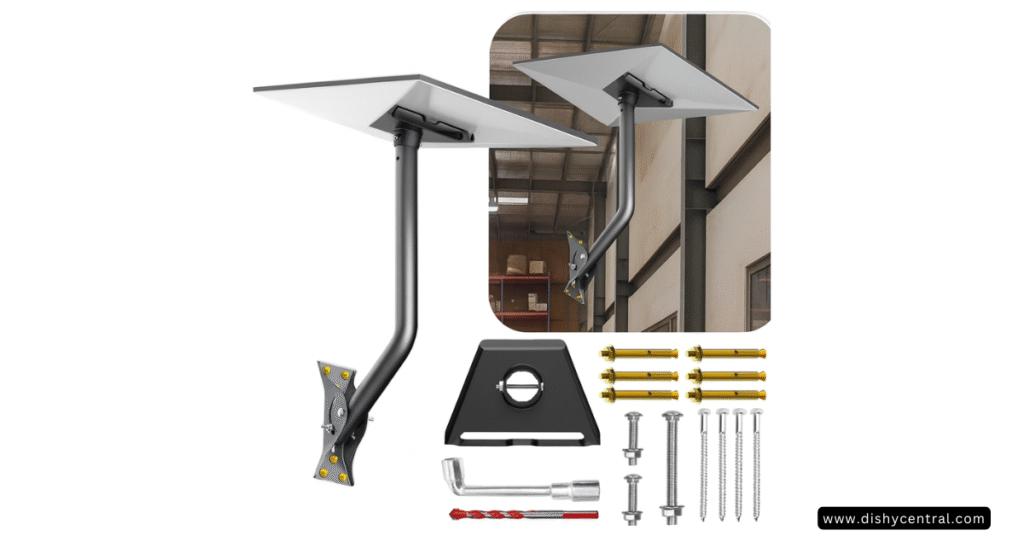
The SUBFIX mount gives you 18 inches of clearance, which is enough for most eave overhangs and fascia installations. The design is thoughtful—you can mount this kit at either end of the support steel tubes, and the pipe adapter rod rotates to help you dial in the perfect angle for your Starlink satellite dish.
The kit includes both expansion screws for concrete walls and lag screws for wooden roofs. This means you’re covered whether you’re attaching to brick, stucco, or wood siding. The aluminum alloy construction ensures your adapter won’t crack or break like the plastic versions some competitors use.
Installation Highlights
Setting this up takes about 30 minutes if you’re comfortable with basic drilling. The package includes everything: the Gen 3 aluminum pipe adapter, extension screws, self-tapping screws, short and long stainless steel screws, support tubes, a mounting base, a wrench, and even a drill bit.
The adjustable design means you can fine-tune your dish orientation without reinstalling the entire mount. Just twist the screws to lock in your preferred angle, and you’re set. This flexibility is particularly valuable if you’re in a location where seasonal satellite coverage patterns shift.
Who Should Choose This Mount
This mount is perfect for homeowners who want a clean, professional-looking installation without the complexity of ground poles or the commitment of roof penetration. If you have an exterior wall with reasonable clearance and want your dish mounted within a day, this is your solution.
It’s also ideal for rental properties where you might need to remove the installation later. The mounting footprint is relatively small, and you can patch the screw holes easily if needed.
Ybervont Ground Pole Mount Kit
Best For Permanent Installations: When you need serious height and rock-solid stability, the Ybervont kit delivers. This is a complete 9-foot pole system with a patented spiral ground anchor that eliminates the need for digging or concrete setting.
Key Features and Benefits
The Ybervont Starlink pole mounting kit elevates your dish significantly higher than wall mounts, making it ideal for properties with tree lines or other obstructions. The 1.5-inch diameter stainless steel pole offers excellent resistance to rust and corrosion, even in coastal environments or areas with harsh winters.
Here’s what makes this kit special: the no-dig spiral anchor design. Traditional pole installations require either digging a hole and setting it in concrete or using a ground sleeve. The Ybervont system twists directly into the ground like a giant screw, providing superior holding power without the hassle. Installation is quick—you can have this set up in under an hour once you’ve identified your location.
The pole sections are modular and portable, folding down to just 2 feet for storage. This makes it surprisingly practical for RV owners or anyone who wants a semi-permanent solution they can take with them.

Installation Process
Setting up the ground pole mount starts with selecting the right spot. You want level ground with that crucial clear field of view. Using the spiral anchor, you’ll twist it into the soil until it’s firmly seated. The anchor provides the foundation strength you need to support the full height of the pole and dish.
Once anchored, you assemble the pole sections, attach the included Starlink Gen 3 pipe adapter at the top, and mount your dish. The stable adapter design locks the rectangular dish securely to the pole structure, even during high winds and heavy rain.
Best Use Cases
This mount excels in rural properties where you have open space but need elevation. If you’re dealing with rolling terrain, scattered trees, or buildings that block your line of sight, the 9-foot height gives you the clearance you need.
It’s also excellent for properties where roof mounting isn’t feasible—maybe you have a metal roof, solar panels, or architectural features that make wall mounting impractical. The ground installation puts your Starlink dish exactly where it needs to be without compromising your home’s structure.
SUBFIX Roof Ridge Mount
The No-Drill Solution: If drilling holes in your roof makes you nervous (and it should), the SUBFIX ridge mount offers a secure alternative that uses weight and gravity instead of penetration.
Unique Design Advantages
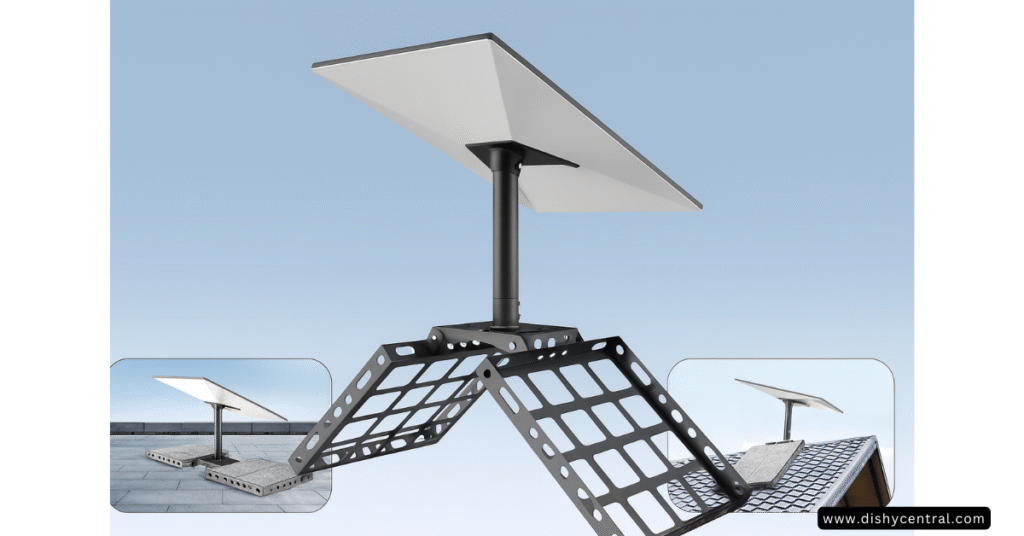
This mount sits on your roof ridge and uses a ballast system for stability. You place standard concrete blocks or bricks in the recessed slots—the design accommodates four 8″x2″x16″ concrete blocks or sixteen standard 8″x2.25″x4″ bricks. The weight keeps everything in place without a single screw entering your roof.
The aluminum adapter and 20-degree tilt angle help optimize signal acquisition, and the 360-degree rotational capability means you can orient your dish perfectly toward the satellites. The powder-coated finish protects against the elements, and at 10.98 pounds, the mount itself is substantial enough to resist movement even before you add the ballast.
Installation Considerations
The no-drill design is both this mount’s biggest advantage and its main limitation. On the plus side, you eliminate any water leakage concerns that come with roof penetration. You’re not voiding warranties or creating potential weak points in your roofing system.
However, you do need to consider the total weight. With the mount, dish, cable, and ballast, you’re adding a significant load to your ridge line. Make sure your roof structure can handle it, especially if you’re dealing with an older home or unusual roof construction.
The 15.7-inch pole size works well for most installations, though it won’t provide as much elevation as the Ybervont ground system. It’s best suited for homes where the roof height already gives you good clearance above surrounding obstructions.
When to Choose the Ridge Mount
This mount is ideal for homeowners who want a professional installation without hiring a contractor to drill mounting holes. It’s particularly appealing if you have a newer roof and don’t want to risk voiding your warranty with penetrations.
The no-drill approach also makes this a good choice for temporary or seasonal installations. Maybe you’re testing Starlink before committing to a permanent setup, or perhaps you’re in a rental situation where modifications aren’t allowed.
| Related: Starlink Roam vs Residential: Key Differences Explained
Starlink Pole Mount Installation Best Practices
Regardless of which mounting kit you choose, following proper installation procedures ensures optimal performance and longevity.
Site Selection Matters
Before you install anything, use the Starlink app to identify obstructions. The app shows you exactly where satellites will be during peak usage times. Position your mount where you have that critical 100-degree cone of clear sky.
Consider future growth too. That small tree that’s barely in the way now might block your signal in two years. Seasonal changes matter—snow accumulation on nearby structures or trees can temporarily obstruct your view during winter months.
Proper Cable Routing
The Starlink Gen 3 system uses standard RG45 cable connectors, which makes routing easier than previous generations. Still, you want to protect your cable from UV damage and physical wear. Most quality mounting kits include cable management solutions or routing channels.
If you’re running the cable along exterior walls, use appropriate clips or conduit. For ground pole installations, consider running the cable through the pole itself to protect it from the elements and create a cleaner appearance.
Grounding and Safety
Any outdoor antenna installation should include proper grounding to protect against electrical surges and lightning. Even though Starlink dishes are relatively small, they’re still elevated metal objects that can attract lightning strikes.
Consult local electrical codes for grounding requirements in your area. Most installations benefit from a separate ground rod connected to the mounting hardware, which then ties into your home’s electrical ground system.
Maintenance Schedule
Once installed, plan for periodic maintenance. Every few months, check that all fasteners remain tight, especially after severe weather. Clear any debris, snow, or leaves that accumulate on the dish surface. Inspect the cable for any signs of wear or damage from animals, weather, or UV exposure.
For ground-mounted systems, verify that the pole remains vertical and stable. Guy wires (if used) should stay taut, and the anchor should show no signs of movement or soil erosion around its base.
Common Starlink Mounting Mistakes to Avoid
Having reviewed countless installation photos and user complaints, certain mistakes appear repeatedly. Avoiding these will save you time, money, and frustration.
Using Inadequate Hardware
The biggest mistake? Trying to save money with the cheapest possible mounting accessory. A plastic pipe adapter might work initially, but it won’t handle sustained wind stress. When your dish crashes to the ground, you’re looking at a $500+ replacement cost—far more than the premium for quality aluminum alloy hardware.
Similarly, undersized poles cause problems. A 1-inch pole might seem sufficient, but it lacks the rigidity needed for windy conditions. Stick with a 1.5-inch diameter minimum for the best balance of compatibility and stability.
Poor Angle Alignment
The Starlink standard actuated dish from previous generations could self-adjust, but Gen 3 is fixed. This means your installation angle matters tremendously. The dish needs to sit at approximately 8 degrees from horizontal, though this varies slightly by location.
Many installers simply mount the dish level and wonder why they’re getting marginal performance. Use the Starlink app during installation to verify optimal alignment before finalizing your mounting angles.
Ignoring Local Weather Patterns
A mount that works perfectly in calm conditions might fail during your area’s typical weather extremes. Coastal locations need corrosion-resistant materials like stainless steel. Areas with heavy snow loads require mounts with adequate clearance and strength to handle ice accumulation.
Wind is the universal challenge. Even moderate sustained winds can cause issues with improperly secured installations. If you live in a consistently windy area, consider guy wires or heavier-duty mounting solutions regardless of which base kit you choose.
Frequently Asked Questions
Can I use my old TV antenna pole for Starlink?
Yes, as long as the pole diameter fits within the 1.25-inch to 2.5-inch range that most pipe adapters accommodate. Verify that the existing pole is structurally sound and securely mounted before adding the weight of your Starlink dish.
How tall should my pole mount be?
Most installations work well with poles between 10 and 20 feet, depending on obstructions. The Starlink app helps you determine the minimum height needed in your specific location. Remember that taller poles introduce more flex and require more robust mounting solutions.
Do I need professional installation?
Not necessarily. The mounting kits reviewed here are designed for DIY installation with basic tools. However, if you’re uncomfortable working at heights, don’t have the necessary tools, or your installation requires electrical work for grounding, hiring a professional makes sense.
Will my Starlink mount work with both Standard and Mini dishes?
The mounts reviewed here are specifically designed for Starlink Standard Gen 3 dishes. The Starlink Mini requires different mounting hardware due to its compact size and different attachment system. Always verify compatibility before purchasing.
Can I paint my mounting kit to match my home?
Yes, most aluminum and steel mounting kits can be painted. Use a quality outdoor metal paint and ensure all surfaces are clean and properly primed. This won’t affect performance and can help your installation blend with your home’s aesthetic.
What about lightning protection?
Any elevated metal structure needs proper grounding. Install a separate ground rod near your mount and connect it to your home’s electrical ground system. In areas with frequent thunderstorms, consider additional surge protection for the cable where it enters your home.
Making Your Final Decision
All three options deliver reliable performance when properly installed. The mounting kit you choose should match your property constraints, budget, and long-term plans for your Starlink internet kit satellite system.
Remember that proper installation matters more than the specific mount you select. Take time to identify the ideal location, use quality hardware throughout, and follow manufacturer guidelines for your chosen mounting solution. Your Starlink dish will reward you with consistently strong signal strength and the high-speed internet connectivity that satellite technology promises.
Ready to upgrade your Starlink installation? These carefully selected mounting kits represent the best options available for Gen 3 installations in 2025, backed by thousands of verified customer installations and positive reviews.

