
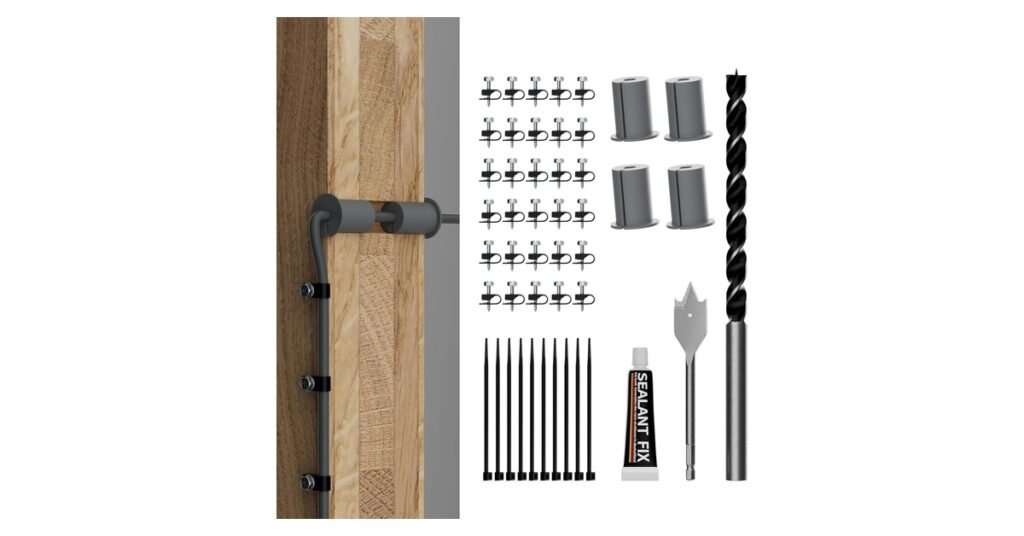
A Starlink cable routing kit is the small set of parts you need to run the Starlink cable through an exterior wall neatly: drill bits to make the hole, grommets to seal it, and clips to hold the cable along the wall. Starlink sells its own Cable Routing Kit and a Masonry Routing Kit in the Starlink shop (Starlink Help Center). If you’d rather order from Amazon, the EAZUSE kit below does the same job, with more grommets and clips, for about $27.
This guide explains what’s in each kit, how they compare, and how to route the cable through a wall without letting water in, using Starlink’s own instructions.
Key Takeaways
- What it’s for: passing the Starlink cable through a wall and tidying the run, instead of leaving it in a door or window.
- Starlink’s kit: a spade bit, drill bit, cable routing tool, silicone sealant, grommets and wall clips. It’s for most walls, but not masonry, concrete or hard coat stucco; those need the Masonry Routing Kit.
- Amazon alternative: the EAZUSE kit has a 1″ spade bit, a 5/16″ drill bit, 4 grommets, 30 wall clips, 10 cable ties and sealant. It’s rated 4.7 stars from 230+ buyers.
- Do it right: drill at a slight upward angle from outside, fit a grommet on both sides, seal the hole, and leave a drip loop below it.
- Don’t: bury the cable, pinch it in a door, or cut and extend it. Starlink says each can hurt service or the warranty.

Official option: Starlink’s own Cable Routing Kit and Masonry Routing Kit are sold in the Starlink shop to account holders once their Starlink kit is ready to ship (Starlink Help Center). The EAZUSE kit is a third-party product, not made by Starlink. It was $26.99 on Amazon on October 1, 2026.
What Is the Starlink Cable Routing Kit?
It’s Starlink’s accessory for getting the cable from the dish outside to the router inside through a drilled hole. Starlink describes it as “designed for drilling through most walls” and not recommended for masonry, concrete, or hard coat stucco. The kit includes a spade bit, drill bit, cable routing tool, silicone sealant, grommets and wall clips. You supply the drill and a stud and electrical finder (Starlink accessories guide).
Starlink says it’s “best for customers with prior internet cable routing experience” who are comfortable drilling through walls. If that isn’t you, consider hiring an installer.
The Masonry Routing Kit
For brick, concrete, block or hard coat stucco (but not EIFS), Starlink sells a separate Masonry Routing Kit. Its guide lists a spade bit, a 3/4″ masonry drill bit, a 1/4″ masonry bit, a cable routing tool, silicone sealant, 5 anchors, 2 grommets and 10 wall clips. You need a hammer drill, plus goggles, gloves and a mask (Masonry Routing Kit guide).
Starlink’s mounts help too: the wall, pivot, pipe adapter and ridgeline mounts each come with 20 cable routing clips (Standard accessories guide). See our guides to Starlink pole mounts and dish placement.
EAZUSE Cable Routing Kit: What You Get
EAZUSE kit contents (per the Amazon listing) |
|
|---|---|
| Spade bit | 1 inch (for the wall hole) |
| Drill bit | 5/16 inch (pilot hole) |
| Wall grommets | 4, silicone, 1 inch wide, about 2 inches long |
| Wall clips | 30 |
| Cable ties | 10 |
| Sealant | 1 tube of waterproof sealant |
| Works with | Gen 2, Gen 3, V5 and Mini cables, per EAZUSE |
| Not included | Drill, stud finder, cable routing tool |
Why we like it:
- It’s a complete kit in one order. Bits, grommets, clips, ties and sealant arrive together, and you don’t need a Starlink account or to wait for the Starlink shop to open for you.
- More hardware than you need for one hole. Four grommets cover two wall holes (inside and outside each), and 30 clips are enough for a long run under eaves or along siding. Starlink’s masonry kit lists 2 grommets and 10 clips.
- Buyers rate it well. It has 4.7 stars from 230+ Amazon ratings and 500+ sales a month, and the recent reviews we read mostly say it came with everything needed.
- The grommets are slotted silicone, so EAZUSE says they stretch over the cable and seal the opening while protecting the cable from the edge of the hole.
Worth knowing:
- The listing disagrees with itself on bit size. The title says 3/4″ and 5/16″, but the package photo and description show a 1″ spade bit. Expect a 1″ hole, which the 1″ grommets are sized for.
- No cable routing tool. Starlink’s kit includes one to help feed the cable through the wall; here you push it through by hand.
- A spade bit is for wood, siding and drywall. For brick, block or concrete you need masonry bits and a hammer drill, so this kit alone won’t do.
- No drill or stud finder, the same as Starlink’s kit.
EAZUSE vs Starlink’s Official Kit
| EAZUSE | Starlink | |
|---|---|---|
| Spade bit | 1 inch | Yes |
| Small drill bit | 5/16 inch | Yes |
| Grommets | 4 | Yes |
| Wall clips | 30 | Yes |
| Cable ties | 10 | Not listed |
| Sealant | Yes | Silicone |
| Routing tool | No | Yes |
| Masonry version | No | Yes, separate kit |
| Where to buy | Amazon | Starlink shop |
Starlink doesn’t publish piece counts for its standard kit; its masonry kit guide lists 2 grommets and 10 clips. Pick Starlink’s kit if you want the official parts and the routing tool, or need the masonry version. Pick the EAZUSE if you want it from Amazon quickly, need extra clips and grommets, or don’t have shop access yet.
How to Route a Starlink Cable Through a Wall
These steps follow Starlink’s routing kit instructions (Masonry Routing Kit guide). Finish setting up and testing your Starlink first, so you know the dish location works before you drill.
- Unplug your Starlink before you start.
- Pick the spot and check behind it. Use a stud and electrical finder. Don’t drill through studs, pipes or wiring, and stay away from outlets and light switches.
- Drill a pilot hole from the outside in, at a slight upward angle. The upward slope keeps rainwater from running indoors along the hole.
- Widen the hole with the spade bit, then clear out any insulation so the cable has a clear path.
- Feed the cable through. Starlink’s guide routes it from inside to outside. Don’t force or kink it.
- Fit a grommet on both the outside and inside wall, and seal around the outside one.
- Clip the cable to the wall, and leave a loop hanging below the hole (a drip loop) so water drips off before it reaches the opening.
- Tie up the spare cable indoors with cable ties instead of cutting it.
Not sure what’s inside the wall? Stop and get an installer or electrician. Starlink says to seek professional help if you’re unsure about any part of the installation.
Starlink’s Cable Rules to Know First
- Don’t bury it or put it under water. Starlink says the cable isn’t rated for either (Starlink Help Center). If it has to cross the ground, protect it in conduit.
- No kinks, debris or door jambs. Damage to the cable can affect your service, which is the main reason to route it through a wall and not a door or window.
- Don’t cut, splice or extend it. Starlink doesn’t recommend modifying the cable or using third-party cables: its connector has a water-resistant seal and the cable is power-rated for the kit. Damage from doing so may void the warranty.
- Check the length first. The Standard 4 and Standard 4 X come with a 15 m (49.2 ft) cable, and the Mini with a 15 m DC cable. Starlink sells a 45 m (147.6 ft) cable for the Standard 4 if the run is longer (Standard accessories guide).
Related: is Starlink waterproof? and, for a wired connection indoors, the Starlink Ethernet adapter.
Other Styles on the Same Listing
The EAZUSE listing has two other options besides the wall routing kit: a DC cable pass-through (2-pack) and an RJ45 cable pass-through. These are bulkhead ports for vans, RVs and boats, where you mount a socket in the wall and plug in on each side. They add a connection in the cable run, which Starlink doesn’t recommend, so they’re best kept for mobile setups where drilling a full-size hole isn’t an option. Make sure you pick the Wall Cable Routing Kit style for a home install. For Mini add-ons, see our Starlink Mini accessories guide.
Pros and Cons
Who Should Buy a Cable Routing Kit?
- Buy one if your cable currently runs through a door or window, you’re mounting the dish permanently on a roof, wall or pole, or you want a sealed, tidy entry point.
- Skip it if your Starlink is a temporary or travel setup, you rent and can’t drill, or your wall is masonry (get Starlink’s Masonry Routing Kit or hire an installer).
Frequently Asked Questions
Does Starlink come with a cable routing kit?
No. The Cable Routing Kit and Masonry Routing Kit are sold separately in the Starlink shop. Starlink’s wall, pivot, pipe adapter and ridgeline mounts do include 20 cable routing clips.
What is in the Starlink Cable Routing Kit?
A spade bit, a drill bit, a cable routing tool, silicone sealant, grommets and wall clips. You need your own drill and a stud and electrical finder.
What size hole do I need for a Starlink cable?
Starlink’s masonry kit uses a 3/4 inch (19 mm) bit for the main hole. The EAZUSE kit uses a 1 inch spade bit with 1 inch grommets. Use the bit and grommets from the same kit so they match.
Can I bury the Starlink cable?
Starlink says the cable isn’t rated to be buried or under water. If it has to cross the ground, run it through conduit.
Can I run the Starlink cable through a window or door?
It works for testing, but Starlink warns that kinks and door jambs can damage the cable and affect service. A sealed wall hole is the lasting fix.
Can I cut or extend the Starlink cable?
Starlink doesn’t recommend modifying the cable or adding third-party cable, and says resulting damage may void the warranty. Buy a longer Starlink cable instead.
Do I need the Masonry Routing Kit?
Yes, if the wall is brick, concrete, block or hard coat stucco. The standard kit and third-party spade-bit kits are for wood, siding and drywall.
Does a cable routing kit work with the Starlink Mini?
EAZUSE lists the Starlink Mini as compatible, for routing the Mini’s DC cable through a wall. Starlink’s Mini kit comes with a 15 m DC cable.
Starlink facts from the Starlink Help Center and Starlink’s accessories and routing kit guides, checked October 1, 2026. EAZUSE details, ratings and price are from its Amazon listing on the same date. We haven’t tested this kit ourselves. Drilling into walls is at your own risk. As an Amazon Associate we earn from qualifying purchases; see our disclaimer. Not affiliated with SpaceX or Starlink.

